Public endpoints for device and group messaging. Documented here:
GET /link, GET/POST /notify/{deviceId}, GET/POST /notify-group/{groupId}, POST /notify-json/{id}, the GET/POST /ping/{beaconId}/{token} beacon heartbeat, the new /live-activity Lock Screen Live Activities, the new /widgets/{id} Lock Screen widgets, the new /screenwidgets/{id} Home Screen widgets, and MDM enterprise deployment.
Web devices: a browser registered through the Notify! web app is an ordinary device to this API. Its Device ID is longer (
WB + 14 characters instead of 8), but every endpoint on this page accepts it unchanged; senders never need to know or care that the receiving screen is a browser. Live Activities are the one exception: they are an iOS Lock Screen feature, and starting one on a web device returns an honest 400. Screen widgets are accepted for a web device like any other, but only the iOS app renders them (iPhone or iPad).
Mac devices: a Mac running the Notify Listener menu bar app is an ordinary device too, in two generations. Newer installs carry a longer Device ID (
MC + 14 characters) and receive real push; older installs keep their 8-character IDs and receive by polling, so a send to one still returns 200 and the Mac collects it within its poll interval. Every endpoint accepts either form unchanged. Live Activities are again the exception: a Mac has no Lock Screen, and a start against one returns the same honest 400. A Mac can own screen widgets too; only the iOS app renders them (iPhone or iPad).
Newer iPhones: a fresh install of the Notify! app from version 6.09.02 carries a longer Device ID too (
IO + 14 characters instead of 8). Earlier installs keep their 8-character IDs, and an update never changes an ID. Every endpoint on this page accepts both forms unchanged, and nothing about delivery differs: an IO phone receives push, starts Live Activities and owns widgets and screen widgets exactly like an 8-character one.
Not in this API: on-device monitoring. Feeds (RSS, Atom and JSON Feed) are read by the app on the device, and website watches run either on the device or against your own ChangeDetection.io server. The gateway sees neither, so there are no feed or watch endpoints on this page. Those alerts also stay out of
GET /device/notifications: the server writes no row for them by design, and they are held only on the device. To push a feed through this API, poll it in your own script and call POST /notify-json/{id} with the new item.
Parameters
Rate limit: This endpoint is limited to 5 calls per minute per IP address.
| Name | In | Type | Required | Description |
|---|---|---|---|---|
id | query | string | required | Device or group ID |
token | query | string | required | Matching device/group token |
Request
GET /link?id=ABC12345&token=XYZ789TOKEN123
Use this for integration tests or setup flows.
cURL
curl "https://push.getnotifyapp.com/link?id=ABC12345&token=XYZ789TOKEN123"
Responses
{
  "success": true,
  "type": "device",
  "id": "ABC12345",
  "name": "Apollo",
  "notification_url": "https://push.getnotifyapp.com/notify/ABC12345",
  "last_active": "2024-12-28T10:30:00Z",
  "platform": "iOS",
  "os_version": "17.0",
  "app_version": "6.08.11",
  "message": "Device credentials validated successfully"
}
{
  "success": true,
  "type": "group",
  "id": "GRP56789",
  "name": "Family Notifications",
  "notification_url": "https://push.getnotifyapp.com/notify-group/GRP56789",
  "last_active": "2024-12-28T10:30:00Z",
  "member_count": 3,
  "created_at": "2024-12-01T08:00:00Z",
  "message": "Group credentials validated successfully"
}
name: for a device this is the name its owner gave it, or the one its client supplied when the OS withholds the real one (iPhone (iOS 27.0), Chrome on macOS). It is always a non-empty string, so you can display it directly. Fields are returned flat, not nested under device or group.
Error: 404 invalid id/token pair, 429 rate limit exceeded (5 calls/minute)
Recommended endpoint. This is the preferred method for all modern integrations. It supports both devices and groups, auto-detection, JSON payloads, custom icons, and notification threading.
Important: Requests must include the Content-Type: application/json header for the body to be parsed correctly.
Overview
Auto-detects device vs group based on ID format (GRP* = group). Supports webhook icons and threading.
Parameters
| Name | In | Type | Required | Description |
|---|---|---|---|---|
id | path | string | required | Device or group ID (auto-detected) |
token | query | string | required | Device or group token |
text | JSON body | string | required | Notification message (no URL encoding needed) |
title | JSON body | string | optional | Notification title |
groupType | JSON body | string | optional | Identifier that controls notification threading/grouping |
iconUrl | JSON body | string | optional | Sender avatar icon URL (HTTPS). Small circular icon next to the title. |
imageUrl | JSON body | string | optional | Hero image URL (HTTPS) rendered inside the expanded notification. JPEG/PNG/GIF, ≤ 10 MB. |
Device Notification
POST /notify-json/ABC12345?token=XYZ789TOKEN123
Content-Type: application/json

{
  "text": "Server CPU at 95%!"
}
Group Notification
POST /notify-json/GRP45678?token=GRPTOKEN456
Content-Type: application/json

{
  "text": "Database maintenance starting in 30 minutes"
}
cURL Examples
Device notification:
curl -X POST "https://push.getnotifyapp.com/notify-json/ABC12345?token=XYZ789TOKEN123" \
  -H "Content-Type: application/json" \
  -d '{"text": "Server CPU at 95%!"}'
Group notification:
curl -X POST "https://push.getnotifyapp.com/notify-json/GRP45678?token=GRPTOKEN456" \
  -H "Content-Type: application/json" \
  -d '{"text": "Database maintenance starting in 30 minutes"}'
Webhook Notifications with Custom Icons
Thread grouping: The groupType parameter controls notification threading. Notifications with the same groupType are grouped together in their own thread, while different values create separate threads.
Basic webhook (default thread):
curl -X POST "https://push.getnotifyapp.com/notify-json/DEVICE_ID?token=TOKEN" \
  -H "Content-Type: application/json" \
  -d '{"text": "Server restarted"}'
GitHub notifications (grouped in one thread):
curl -X POST "https://push.getnotifyapp.com/notify-json/DEVICE_ID?token=TOKEN" \
  -H "Content-Type: application/json" \
  -d '{
    "text": "Deploy succeeded",
    "title": "GitHub Actions",
    "groupType": "github-ci",
    "iconUrl": "https://github.com/favicon.ico"
  }'
Jenkins notifications (separate thread from GitHub):
curl -X POST "https://push.getnotifyapp.com/notify-json/DEVICE_ID?token=TOKEN" \
  -H "Content-Type: application/json" \
  -d '{
    "text": "Build #142 passed",
    "title": "Jenkins",
    "groupType": "jenkins-ci",
    "iconUrl": "https://jenkins.io/favicon.ico"
  }'
With a hero image (icon + inline image shown when expanded):
curl -X POST "https://push.getnotifyapp.com/notify-json/DEVICE_ID?token=TOKEN" \
  -H "Content-Type: application/json" \
  -d '{
    "text": "New photo uploaded to shared album",
    "title": "Photos",
    "iconUrl": "https://example.com/photos-favicon.png",
    "imageUrl": "https://example.com/preview.jpg"
  }'
Malformed JSON handling:
curl -X POST "https://push.getnotifyapp.com/notify-json/DEVICE_ID?token=TOKEN" \
  -H "Content-Type: application/json" \
  -d '{bad json here}'

# Returns: 400 Bad Request
# {
#   "error": "Bad Request",
#   "message": "Invalid JSON in request body",
#   "details": "..."
# }
Custom Icons
When iconUrl is provided, Notify! attempts to load the custom icon. If unavailable, it falls back to a generic icon to ensure notifications always display properly.
Device Response
{
  "success": true,
  "type": "device",
  "deviceId": "ABC12345",
  "message": "Notification sent successfully"
}
Group Response
{
  "success": true,
  "type": "group",
  "groupId": "GRP45678",
  "groupName": "DevOps Team",
  "message": "Group notification sent",
  "deviceCount": 3,
  "successCount": 3,
  "failureCount": 0,
  "results": [
    {"deviceId": "ABC12345", "success": true},
    {"deviceId": "DEF67890", "success": true},
    {"deviceId": "GHI23456", "success": true}
  ]
}
Error Response
{
  "error": "Bad Request",
  "message": "Missing required field: text",
  "required": ["text"],
  "optional": ["title", "iconUrl", "groupType"]
}
Errors: 400 missing text field or invalid JSON, 403 invalid token, 404 ID not found, 415 missing or incorrect Content-Type header
Key Points
- Single endpoint:
/notify-json/{id} - Required: Must include
Content-Type: application/jsonheader - Auto-detects device vs group based on ID (GRP* = group)
- Returns
"type"field so you know what was processed - No URL encoding needed for the message text
- Supports webhook icons via
iconUrlparameter (case-sensitive): small sender avatar - Supports hero images via
imageUrlparameter (case-sensitive): JPEG/PNG/GIF rendered inline when the notification is expanded, ≤ 10 MB iconUrlandimageUrlare independent, use either or both- Threading: Use
groupTypeto group notifications - same type = same thread, different type = separate threads (case-sensitive) - Robust icon fallback ensures webhook notifications always display properly
Try it live
Build and send a real notification, upload icons, and grab code for your integration.
Open Notification Builder arrow_forwardParameters
Note: Both GET and POST methods are supported with identical parameters.
New: Now supports title, iconUrl, and groupType for enhanced notifications.
| Name | In | Type | Required | Description |
|---|---|---|---|---|
deviceId | path | string | required | Target device ID |
token | query | string | required | Device token |
body | query | string | required | Notification message. URL-encode if sent in query/form. |
title | query | string | optional | Custom notification title (URL-encode) |
iconUrl | query | string | optional | Sender avatar icon URL (HTTPS, URL-encode) |
imageUrl | query | string | optional | Hero image URL (HTTPS, URL-encode) rendered inline on expansion. JPEG/PNG/GIF, ≤ 10 MB. |
groupType | query | string | optional | Thread identifier for grouping notifications |
Request Examples
Basic notification (GET):
GET /notify/ABC12345?token=XYZ789TOKEN123&body=Hello%20World
Enhanced notification with all features (GET):
GET /notify/ABC12345?token=TOKEN&body=Server%20CPU%20at%2095%25&title=Alert&groupType=monitoring&iconUrl=https%3A%2F%2Fexample.com%2Ficon.png
cURL Examples
Basic notification:
curl "https://push.getnotifyapp.com/notify/ABC12345?token=XYZ789TOKEN123&body=Hello%20World"
Enhanced with custom title and icon:
curl "https://push.getnotifyapp.com/notify/ABC12345?token=TOKEN&body=Server%20down&title=Critical%20Alert&iconUrl=https://example.com/alert.png&groupType=server-alerts"
Using POST with threading:
curl -X POST "https://push.getnotifyapp.com/notify/ABC12345?token=TOKEN&body=Build%20passed&title=CI/CD&groupType=github-actions"
Responses
{
  "success": true,
  "deviceId": "ABC12345",
  "message": "Notification sent successfully"
}
Errors: 403 invalid device token, 404 device not found, 400 delivery failed (for example a web device whose push subscription has gone dead)
Parameters
Note: Both GET and POST methods are supported with identical parameters.
New: Now supports title, iconUrl, and groupType for enhanced notifications.
| Name | In | Type | Required | Description |
|---|---|---|---|---|
groupId | path | string | required | Target group ID |
token | query | string | required | Group token |
body | query | string | required | Notification message. URL-encode if sent in query/form. |
title | query | string | optional | Custom notification title (URL-encode) |
iconUrl | query | string | optional | Sender avatar icon URL (HTTPS, URL-encode) |
imageUrl | query | string | optional | Hero image URL (HTTPS, URL-encode) rendered inline on expansion. JPEG/PNG/GIF, ≤ 10 MB. |
groupType | query | string | optional | Thread identifier for grouping notifications |
Request Examples
Basic group notification (GET):
GET /notify-group/GRP56789?token=GROUP_TOKEN&body=Hello%20team!
Enhanced notification with all features (GET):
GET /notify-group/GRP56789?token=TOKEN&body=Deploy%20complete&title=DevOps&groupType=deployments&iconUrl=https%3A%2F%2Fexample.com%2Fcheck.png
cURL Examples
Basic group notification:
curl "https://push.getnotifyapp.com/notify-group/GRP56789?token=GROUP_TOKEN&body=Hello%20team!"
Enhanced with custom title and icon:
curl "https://push.getnotifyapp.com/notify-group/GRP56789?token=TOKEN&body=Deployment%20successful&title=Production&iconUrl=https://example.com/success.png&groupType=prod-deploys"
Using POST with threading:
curl -X POST "https://push.getnotifyapp.com/notify-group/GRP56789?token=TOKEN&body=All%20tests%20passed&title=CI/CD&groupType=test-results"
Responses
{
  "success": true,
  "groupId": "GRP56789",
  "groupName": "Family Notifications",
  "message": "Group notification sent",
  "deviceCount": 3,
  "successCount": 3,
  "failureCount": 0,
  "results": [ { "deviceId": "ABC12345", "success": true } ]
}
Poll-only Macs: older Notify Listener installs receive no push, so they do not appear in results; the message reaches them the next time they poll the group. A group made up entirely of poll-only Macs still answers success, with results empty. Newer MC Macs are pushed like any other member and do appear.
Errors: 403 invalid group token, 404 group not found
Overview
A Beacon is reverse monitoring: instead of Notify! telling you when something happens, it tells you when something stops happening. Create a beacon in the app (Devices tab > Beacons), pick how often you expect a ping plus a grace period, and paste its ping URL into the cron job, backup script, or device you want watched. If no ping arrives within the period plus grace, every targeted device gets a Down alert (a push, or the next poll for an older poll-only Mac). When pings resume you get an Up recovery push, and while it stays down you get periodic reminders.
Beacons are created and managed inside the app; only the ping URL below is called from your systems. A beacon can alert a single device or a whole Device Group (Macs running Notify Listener included).
Parameters
| Name | In | Type | Required | Description |
|---|---|---|---|---|
beaconId | path | string | required | Beacon ID, format CHK + 5 characters (shown in the app) |
token | path | string | required | 15-character ping token (the URL from the app already includes it) |
Methods: GET, POST, and HEAD all behave identically. The request body and Content-Type are ignored, so it works from anything that can hit a URL. Treat the ping URL as a secret: whoever has it can mark your job "alive".
cURL
curl -fsS --retry 3 "https://push.getnotifyapp.com/ping/CHK7Q2ZK/aB3dE5fG7hJ9kL2" > /dev/null
Crontab heartbeat
# Ping every 30 minutes; alert if two in a row are missed
*/30 * * * * curl -fsS --retry 3 "https://push.getnotifyapp.com/ping/CHK7Q2ZK/aB3dE5fG7hJ9kL2" > /dev/null
Put the curl at the end of a job so a crashed job never pings, or run it on its own schedule as a machine heartbeat.
Responses
200 OK
Errors: 404 unknown beacon or wrong token (identical responses, nothing to probe). There is no failure-signal endpoint: down detection is purely timed, so to test an alert just stop pinging.
Lifecycle
Waiting (created, first ping arms the schedule) → Up → Down (no ping for period + grace, checked every minute) → Up on the next ping. Pausing in the app silences alerts; pings still count so resuming re-arms cleanly.
Overview
A Live Activity is a single Lock Screen Live Activity that updates in place: it appears when a job starts, changes while it runs (progress bar, live countdown, status), and disappears when it ends. One Live Activity instead of a stack of notifications. The device address is an upsert: your first call starts the Live Activity (it appears even when the Notify! app is closed, via push-to-start, as long as the app has been opened once on the device), every later call to the same address updates it, and &end=1 finishes it. One static URL is the whole lifecycle; the returned activityId exists for precision when you run several Live Activities at once.
Countdowns cost one request. Send endsIn (seconds from now, never a timestamp: no time zones, no clock skew) and iOS ticks the countdown locally with no further requests. A progress bar costs one request per change. The in-app Builder (Settings > Notification Builder > Live Activity) composes all of this with a live preview and copyable code.
Parameters (start and update share the same fields)
| Name | In | Type | Required | Description |
|---|---|---|---|---|
id | path | string | required | Your device ID (starts the Live Activity, then updates it: an upsert), or a specific activityId (LA + 6) when running several Live Activities |
token | query | string | required | Your device token (same credential as /notify) |
title | body | string | start only | Live Activity title, max 120 chars ("Laundry") |
body | body | string | optional | Second line, max 300 chars |
symbol | body | string | optional | SF Symbol name for the icon ("washer.fill") |
tint | body | string | optional | Accent color, #RRGGBB or #AARRGGBB |
progress | body | number | optional | Progress bar, 0 to 100 |
endsIn | body | integer | optional | Countdown: seconds from now, 1 to 86400 |
trailing | body | string | optional | Static trailing text when there is no timer ("queued", "#3"), max 40 chars |
status | body | string | optional | Free-form phase word ("running", "done"), max 40 chars |
steps | body | integer | optional | Total stages, 2 to 20. Turns the bar into stage segments; null clears both steps and step |
step | body | integer | optional | Stages COMPLETED (3 of 5 lights the first three). Clamps to 0..steps; the one-field update {"step": 4} advances the bar |
metrics | body | array | optional | Up to 6 {label, value, unit?, color?, bar?} objects shown as chips where the body line goes, like a small dashboard. label max 24, value a string max 16 ("87" and "$1.2k" both work), unit max 8, color an optional per-metric hex accent. Percentage values also draw a mini bar, and bar chooses how it looks: "pills" (the default, ten segments) or "fill" (one continuous bar). Anything else is ignored and draws pills, exactly as unknown metric keys always have been. A value that is not a percent draws no bar at all, so bar is ignored there. App builds before 6.09.06 do not know the field and draw pills, so it is safe to send now. Replaces wholesale on update. JSON body only, never a query parameter |
button | body | object | optional | One tappable button: {title, url, open?, method?}. title max 20; url https only, max 512. Your phone fires it when tapped, never Notify's servers: open: true opens the link, otherwise the phone performs the request itself (GET or POST, default POST), so a webhook on your own network works. null removes it. JSON body only |
keepFor | body | integer | optional | DELETE only: seconds the finished Live Activity lingers, 0 to 14400 (4 h). Default 0 = leaves immediately |
Updates are partial. Send only what changed: {"progress": 94} is a complete update. An explicit null clears a field ({"endsIn": null} removes the countdown). Content-Type: application/json is required for JSON bodies.
There is no type field: the fields ARE the type, and they compose. progress draws a bar, endsIn a ticking countdown, steps makes the bar segmented, metrics a small dashboard, and a deploy Live Activity can carry steps AND a countdown at once. When several compete for the same spot: steps beat the plain bar, which beats the time bar; the featured value runs countdown, then trailing, then the step fraction, then status. metrics replaces the body TEXT line, which makes body a free fallback: phones on older app builds show the sentence, newer ones show the dashboard, so send both. A button composes with any of it.
Or skip JSON entirely: one static URL is the whole API. The device address is an upsert: the first call with query parameters starts the Live Activity, every later call updates it, and &end=1 finishes it: /live-activity/{deviceId}?token=...&title=Laundry&endsIn=2700&progress=25. Since the device id and token never change, that URL can live in a service's configuration forever. Running several Live Activities at once is explicit: pass &new=1 to start extras and address each by its returned activityId; a device call while several are live returns 409 listing them. Add &format=text to a start for a plain-text response containing only the id.
The layouts, at a glance
Every layout below is the same endpoint and the same Live Activity; only the fields differ, and they combine freely. The JSON under each card is the complete body that produces it.
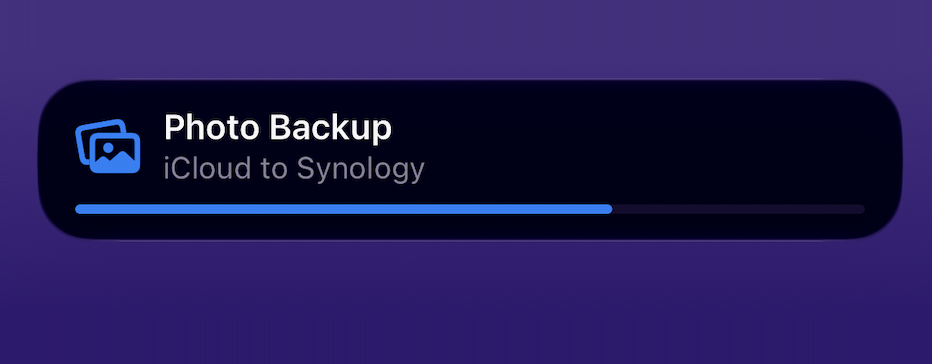
Show the code
{
  "title": "Photo Backup",
  "body": "iCloud to Synology",
  "symbol": "photo.on.rectangle.angled",
  "tint": "#0A84FF",
  "progress": 68
}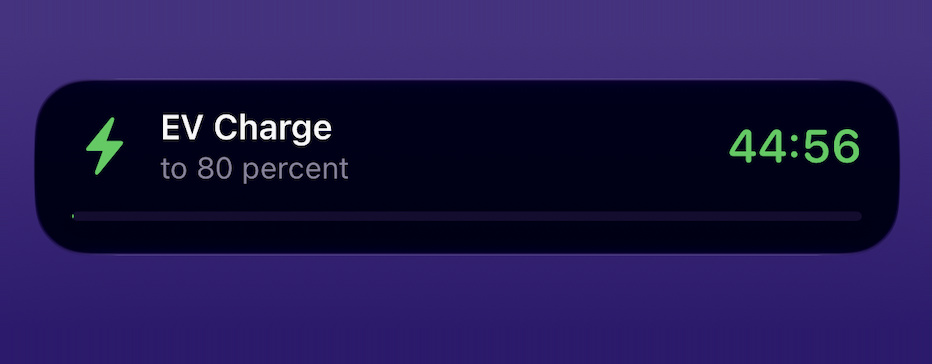
Show the code
{
  "title": "EV Charge",
  "body": "to 80 percent",
  "symbol": "bolt.fill",
  "tint": "#30D158",
  "endsIn": 2700
}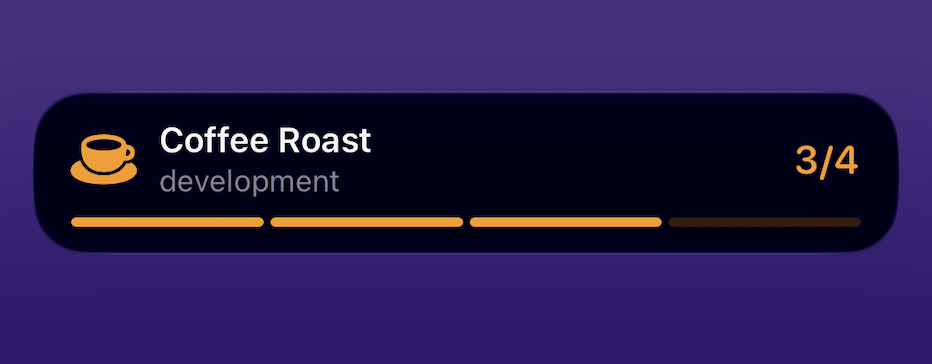
Show the code
{
  "title": "Coffee Roast",
  "body": "development",
  "symbol": "cup.and.saucer.fill",
  "tint": "#FF9F0A",
  "steps": 4,
  "step": 3
}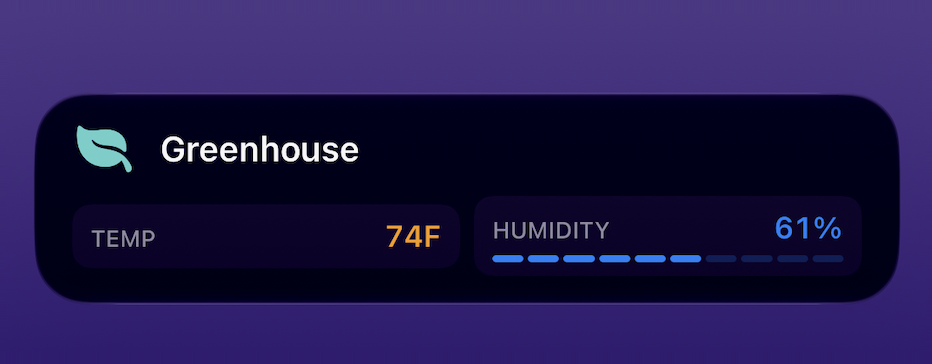
61% has one and 74F does not. Note the Live Activity shows no detail line: metrics takes the body’s place, which is what makes body a free fallback for older app builds.Show the code
{
  "title": "Greenhouse",
  "body": "74F and 61% humidity",
  "symbol": "leaf.fill",
  "tint": "#66D4CF",
  "metrics": [
    { "label": "TEMP", "value": "74", "unit": "F", "color": "#FF9F0A" },
    { "label": "HUMIDITY", "value": "61%", "color": "#0A84FF" }
  ]
}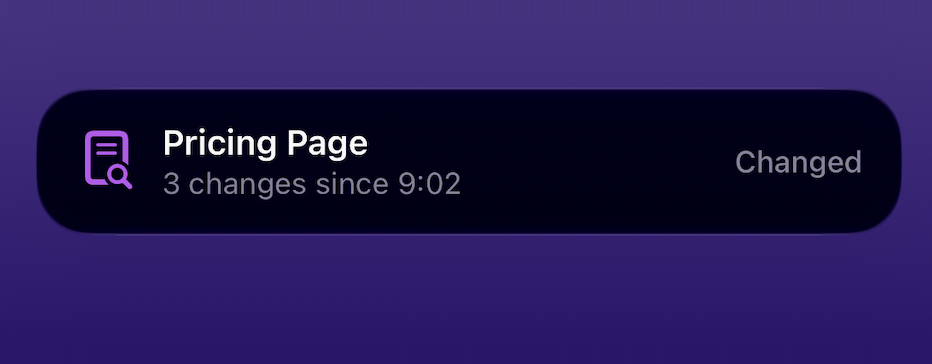
Show the code
{
  "title": "Pricing Page",
  "body": "3 changes since 9:02",
  "symbol": "doc.text.magnifyingglass",
  "tint": "#BF5AF2",
  "status": "Changed"
}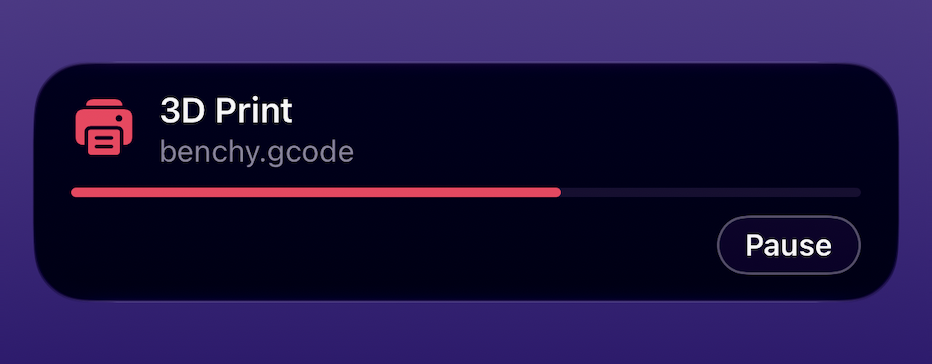
open: true opens it as a link instead.Show the code
{
  "title": "3D Print",
  "body": "benchy.gcode",
  "symbol": "printer.fill",
  "tint": "#FF375F",
  "progress": 62,
  "button": {
    "title": "Pause",
    "url": "https://octoprint.example.com/api/pause"
  }
}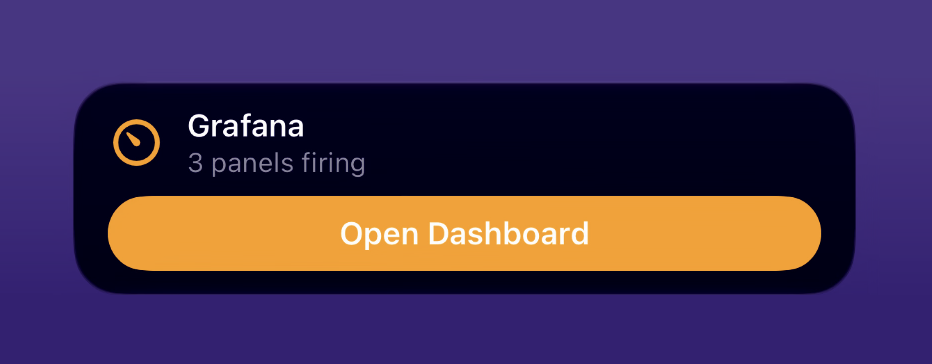
progress, steps, metrics or countdown to share the card, the app promotes the button from a quiet capsule to a full-width pill, so the Live Activity is an action waiting on the Lock Screen rather than a job reporting on itself. open: true opens the link instead of firing it.Show the code
{
  "title": "Grafana",
  "body": "3 panels firing",
  "symbol": "gauge.with.needle",
  "tint": "#FF9F0A",
  "button": {
    "title": "Open Dashboard",
    "url": "https://grafana.example.com/d/alerts",
    "open": true
  }
}
The two button flavors are one field. You never ask for the full-width treatment; the app decides. A button sent alongside a bar or a metrics row stays the quiet capsule (shot six), and a button sent with none of them becomes the tile (shot seven). The tap differs too: by default your phone makes the request, so the URL can reach a printer or a server on your own network that no cloud service could, while open: true hands the link to the system to open instead.
Ending a Live Activity DELETE
Always end your Live Activity. Without an explicit end, iOS leaves a finished Live Activity on the Lock Screen for up to four hours, so a script that simply stops calling strands a frozen "91%" in front of the user. This is the most commonly missed step in a Live Activity integration.
| Name | In | Type | Required | Description |
|---|---|---|---|---|
id | path | string | required | An activityId to end that exact Live Activity, or a device ID to end the device's single Live Activity |
token | query | string | required | Your device token |
keepFor | body | integer | optional | Seconds to deliberately leave the finished Live Activity visible. Omit it and the Live Activity clears at once |
Any content field from the table above (progress, status, body, and the rest) may be sent too, and becomes the final state the Live Activity shows as it closes. | ||||
Idempotent, and forgiving in the device-ID form. Ending an already-finished Live Activity succeeds and reports how it actually finished, so an end-of-job hook never fails for having already worked. Addressed by device ID, no Live Activity is likewise a success, while several Live Activities return the teaching 409 listing them so you can end one by its activityId. Bad credentials always answer a uniform 403, which never reveals whether the id exists.
The one-URL equivalent: &end=1 on the same path does exactly this, so a service that can only be handed a single static URL still gets a clean finish.
# Either form ends it. The body is the last thing the Live Activity shows.
curl -X DELETE "https://push.getnotifyapp.com/live-activity/LA7Q2ZKM?token=YOUR_TOKEN" \
  -H "Content-Type: application/json" -d '{"progress":100,"status":"done"}'

curl "https://push.getnotifyapp.com/live-activity/ABC12345?token=YOUR_TOKEN&end=1&status=done"
Reading status GET
A bare GET, one carrying no content parameters, reads instead of acting:
| Called with | Returns |
|---|---|
an activityId | Full status of that one Live Activity, including endReason for a Live Activity that has already finished. Readable for one day after it ends, then the row is cleaned up |
| a device ID | Every Live Activity currently running on that device. This is the crash-recovery path: a script that lost its activityId lists its device and reattaches |
# Did it finish, and how?
curl "https://push.getnotifyapp.com/live-activity/LA7Q2ZKM?token=YOUR_TOKEN"

# Lost the id? List what is live on the device and reattach
curl "https://push.getnotifyapp.com/live-activity/ABC12345?token=YOUR_TOKEN"
A GET carrying content parameters ACTS instead of reading, with exactly the semantics of POST: ?title=...&endsIn=2700 starts, ?progress=94 updates, &end=1 ends. That is the house /notify idiom, so anything that can only fetch a URL still drives the whole lifecycle.
cURL: start, update, end
# Start: returns { "activityId": "LA7Q2ZKM" } - keep it
curl -X POST "https://push.getnotifyapp.com/live-activity/ABC12345?token=YOUR_TOKEN" \
  -H "Content-Type: application/json" \
  -d '{"title":"Laundry","symbol":"washer.fill","tint":"#7C3AED","progress":0,"endsIn":2700}'
# Update: the bar moves in place
curl -X POST "https://push.getnotifyapp.com/live-activity/LA7Q2ZKM?token=YOUR_TOKEN" \
  -H "Content-Type: application/json" \
  -d '{"progress":94}'
# End: without this a dead Live Activity can linger for hours
curl -X DELETE "https://push.getnotifyapp.com/live-activity/LA7Q2ZKM?token=YOUR_TOKEN" \
  -H "Content-Type: application/json" \
  -d '{"progress":100,"status":"done"}'
Responses
Every success is 200 with JSON (a start called with &format=text answers with the bare id instead). The start response, with the id to keep:
{
  "success": true,
  "activityId": "LA7Q2ZKM",
  "expiresAt": "2026-08-10T23:24:00.000Z"
}
# Update
{ "success": true, "activityId": "LA7Q2ZKM" }

# End. Idempotent: ending an already-finished Live Activity still succeeds,
# with "state" reporting how it actually finished ("ended"/"dismissed")
{ "success": true, "activityId": "LA7Q2ZKM", "state": "ended" }

# End on the device URL with no Live Activity: still success, never an error
{ "success": true, "message": "No live activity to end" }

# GET one Live Activity (works for a day after it finishes; endReason says why:
# "script", "dismissed", "never-started", "overdue", "abandoned")
{ "activityId": "LA7Q2ZKM", "state": "active", "endReason": null,
  "content": { "title": "Laundry", "progress": 80, "endsAt": 1786456988 },
  "endsAt": "2026-08-11T13:56:28.000Z", "startedAt": "...",
  "updatedAt": "...", "endedAt": null, "expiresAt": "..." }

# GET on the device id: your Live Activities (empty array when none)
{ "activities": [ { "activityId": "LA7Q2ZKM", "state": "active", ... } ] }
Errors: every error is JSON with error and a human-readable message written to be shown. 403 invalid token or unknown id (identical responses, nothing to probe), 409 the device cannot show Live Activities yet and the message says why; the device-URL ambiguity 409 (several running, no new=1) also carries an activityIds array so a script can pick one, 410 the Live Activity was dismissed or ended (the message names the reason; start a new one), 400 validation with the failing field named (a malformed JSON body gets the same treatment; a device that can never show Live Activities, a Mac or a web browser, also answers 400 with a message naming what it is), 429 Apple is silently ignoring starts for this device: the message says how long to wait, machine-readable in retryAfterSeconds and a Retry-After header (openingTheAppMayHelp says whether opening the Notify app can shortcut it; when false, only the wait will), 502 the start failed, and deliveryState says how: "not-delivered" means no Live Activity exists and starting again cannot duplicate one (retry only if retryAfterSeconds is present, and wait that long; without it the same request will fail the same way), while "unknown" means Apple never answered, a Live Activity may be appearing, and the returned activityId should be polled rather than retried with new=1, 503 Live Activities temporarily disabled server-side (ending and status always keep working).
Good to know
A Live Activity lives at most 8 hours (Apple's limit; the start response echoes it as expiresAt). Longer job? Start a fresh Live Activity when the old one ends. If the user swipes the Live Activity away, that is final: updates to its id return 410, and the device address answers the same 410 while the dismissed job would still have been running, so a looping script cannot respawn a swiped Live Activity by accident (&new=1 starts a fresh Live Activity deliberately, and after the job's window the device URL starts fresh on its own). Because the device address upserts, a retried call can never duplicate a Live Activity. GET /live-activity/{activityId}?token=... reports status and, for finished Live Activities, why they ended; a bare GET /live-activity/{deviceId}?token=... lists your Live Activities. The app records one History entry when a Live Activity appears; the update stream stays out of history by design, so progress noise never buries real notifications. One more Apple quirk the server absorbs for you: updating or reinstalling the app rotates the device's start credential, and starts sent to the old one are accepted by Apple but never appear. The server notices (a start with no Live Activity after 15 minutes reports never-started), backs off with an honest 429 instead of burning the device's spawn budget, and re-sends a pending start automatically the next time the app opens and reports a changed credential. If the credential comes back unchanged nothing is re-sent, deliberately: a start push stays deliverable for the same 15 minutes the row is re-drivable in, so re-sending on a hunch could put a second Live Activity on the Lock Screen that no id addresses.
Overview
A widget is one named value on the Lock Screen that your scripts keep fresh: a temperature, a queue depth, a stock level. Unlike a Live Activity nothing is ever pushed. The phone polls the device's widget list when iOS refreshes its widgets, roughly every 15 minutes and on the operating system's own schedule, so a widget suits numbers that drift, not alerts. A widget also has no lifecycle: there is nothing to end, and it stays until you delete it. Each device holds up to 10.
The device address is an upsert, like /live-activity. With no widgets a call carrying content CREATES one, with exactly one it UPDATES it in place, and with several it returns 409 listing every widgetId so you can address the one you meant. &new=1 always creates another. The returned widgetId (WG + 6) is the precise handle: calls to /widgets/WG2D9FLD always mean that exact widget.
Parameters (create and update share the same fields)
| Name | In | Type | Required | Description |
|---|---|---|---|---|
id | path | string | required | Your device ID (creates the widget, then updates it: an upsert), or a specific widgetId (WG + 6) when feeding several widgets |
token | query | string | required | Your device token (same credential as /notify) |
title | body | string | create only | The widget's name, max 120 chars ("CPU Load"). The one field an update cannot clear |
value | body | string | optional | The headline value, as display text you pre-format ("92", "$1,024", "OPEN"), max 40 chars. A bare JSON number is accepted and stored as its string |
unit | body | string | optional | Small unit label beside the value ("%", "GB"), max 12 chars |
detail | body | string | optional | A quieter line under the value, max 120 chars |
symbol | body | string | optional | SF Symbol name for the icon ("cpu", "thermometer.medium"), max 64 chars |
tint | body | string | optional | Accent color, #RRGGBB or #AARRGGBB (leading # optional) |
progress | body | number | optional | An optional gauge, 0 to 100. Out-of-range numbers are clamped, never rejected |
Updates are partial, and null deletes. Send only what changed: {"value": "93"} is a complete update. An absent field is left alone, and an explicit null removes one ({"detail": null}), with one exception: title is the widget's identity in the phone's picker, so it can be replaced but never cleared (a named 400). updatedAt is stamped by the server on every write; sending it yourself is also a named 400. Content-Type: application/json is required for JSON bodies.
Or skip JSON entirely: every field works in the URL. Unlike a Live Activity there is no array-shaped field to exclude, so one address is the whole API: /widgets/{deviceId}?token=...&title=CPU%20Load&value=92&unit=%25 creates the widget on its first call and keeps updating it forever after. Add &new=1 to create extras, &format=text to a create for a plain-text response containing only the id, and &delete=1 to delete. A non-empty JSON body wins entirely over query parameters, so the two dialects can never half-merge.
The widget, at a glance
Each screenshot is one widget wearing both of its Lock Screen faces, the rectangle and the circle, side by side. The JSON under each card is the exact create body that produced it.
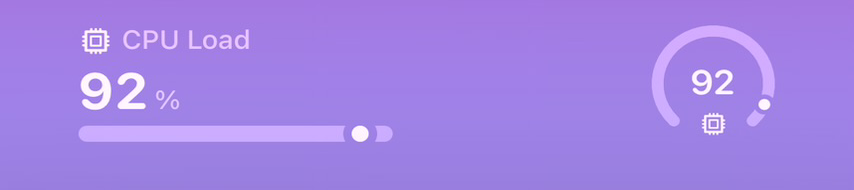
progress drives the bar on the rectangle and the ring on the circle.Show the code
{
  "title": "CPU Load",
  "value": "92",
  "unit": "%",
  "detail": "8 cores, load rising",
  "symbol": "cpu",
  "tint": "#0A84FF",
  "progress": 92
}
Show the code
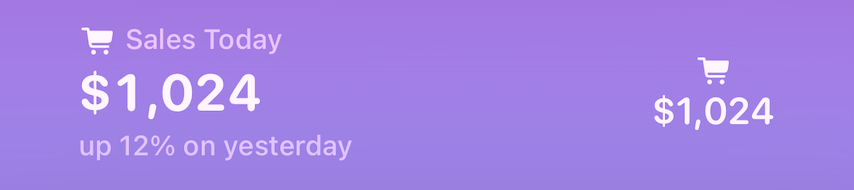
{
  "title": "Sales Today",
  "value": "$1,024",
  "detail": "up 12% on yesterday",
  "symbol": "cart.fill",
  "tint": "#30D158"
}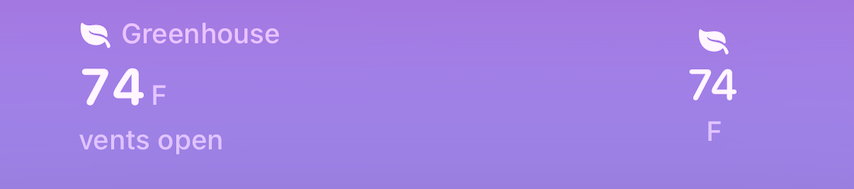
Show the code
{
  "title": "Greenhouse",
  "value": "74",
  "unit": "F",
  "detail": "vents open",
  "symbol": "leaf.fill",
  "tint": "#66D4CF"
}
After you add the widget (touch and hold the Lock Screen, Customize, pick Notify!), tap the widget while still in customize mode to choose which of your widgets it shows.
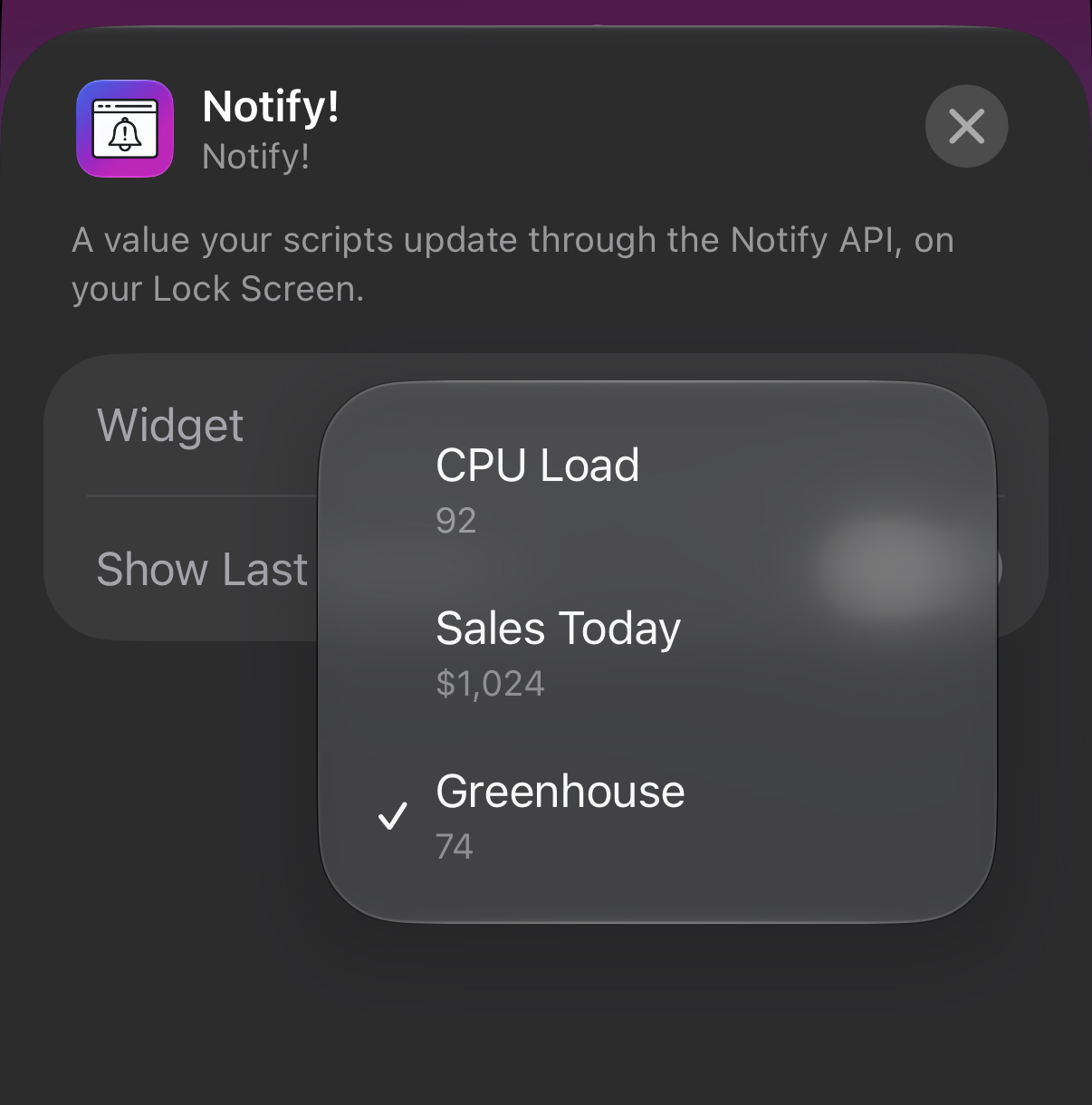
cURL: the whole quartet
# Create: returns { "widgetId": "WG2D9FLD" } - keep it
curl -X POST "https://push.getnotifyapp.com/widgets/ABC12345?token=YOUR_TOKEN" \
  -H "Content-Type: application/json" \
  -d '{"title":"CPU Load","value":"92","unit":"%","symbol":"cpu","tint":"#0A84FF","progress":92}'
# Update: the number changes on the phone's next widget refresh.
# null deletes a field; title is the one field that cannot be cleared
curl -X POST "https://push.getnotifyapp.com/widgets/WG2D9FLD?token=YOUR_TOKEN" \
  -H "Content-Type: application/json" \
  -d '{"value":"93","progress":93,"detail":null}'
# Read: one widget by its id, or every widget on the device (oldest first)
curl "https://push.getnotifyapp.com/widgets/WG2D9FLD?token=YOUR_TOKEN"
curl "https://push.getnotifyapp.com/widgets/ABC12345?token=YOUR_TOKEN"
# Delete: when the number stops mattering
curl -X DELETE "https://push.getnotifyapp.com/widgets/WG2D9FLD?token=YOUR_TOKEN"
Responses
A create answers 201 (or plain text containing only the id with &format=text); everything else is 200 with JSON. Every read and write returns the widget with an updateUrl ready to paste into whatever keeps the value fresh:
{
  "widgetId": "WG2D9FLD",
  "content": { "title": "CPU Load", "value": "92", "unit": "%", ... },
  "createdAt": "2026-08-30T16:55:02.217Z",
  "updatedAt": "2026-08-30T16:55:02.235Z",
  "updateUrl": "https://push.getnotifyapp.com/widgets/WG2D9FLD?token=..."
}
# GET on the device id: your widgets, oldest first (empty array when none)
{ "widgets": [ { "widgetId": "WG2D9FLD", "content": { ... }, ... } ] }

# Delete. Idempotent: a device URL with nothing to delete still succeeds
{ "success": true, "deleted": true, "widgetId": "WG2D9FLD" }
{ "success": true, "message": "No widget to delete", "deleted": false }
Errors: every error is JSON with error and a human-readable message. 400 validation with the failing field named, the cap of 10 widgets per device, or merged content over 1024 bytes; 403 invalid token or unknown id (identical responses, nothing to probe); 409 the device URL is ambiguous because several widgets exist, with a widgetIds array so a script can pick one (or pass &new=1); 503 widgets temporarily disabled server-side. The kill switch gates creates and updates only: reads and deletes stay live, so placed widgets keep rendering and can always be removed.
Good to know
A quick word about timing. iOS decides when widgets refresh, roughly every 15 minutes and sometimes longer, so a widget is for values worth glancing at, not for anything urgent (urgent is what notifications are for). Your script can update as often as it likes; the phone simply shows whatever value was stored the last time it looked. If you want readers to see how fresh the number is, the widget's Edit Widget sheet has an optional Show Last Updated line that ticks on its own.
Widgets also never expire. One your script stops feeding keeps its last value forever, so delete widgets you no longer update. Each device holds at most 10, and a script only ever creates a second widget by passing new=1: a repeating script that leaves new=1 out updates the same widget forever instead of filling the cap.
Overview
A screen widget is a Home Screen tile (small, medium or large) that persists: where a Live Activity appears when a job starts and leaves when it ends, a screen widget is always there, showing the latest thing your script stored. It carries the whole Live Activity content set: title, body, symbol, tint, a progress bar, segmented steps, a countdown, a metrics grid, a button. The point is the fan-out: one JSON body drives a Live Activity while a job runs and a Home Screen tile forever, so a script posts the same payload to both addresses. Like a Lock Screen widget, nothing is ever pushed. The phone polls the device's list when iOS refreshes its widgets, roughly every 15 minutes and on the operating system's own schedule, so a screen widget suits things worth glancing at, not alerts. It has no lifecycle either: there is nothing to end, and it stays until you delete it. Each device holds up to 10.
The tile arrives with the September 2026 app update. The server accepts, stores and serves screen widgets on its own, so every call on this page works from any script. The Notify! Dashboard widget that renders them ships in the September 2026 update of the Notify! app (6.09.03), where screen widgets are managed under Settings > Home Screen Widgets and the tile is placed through iOS's own Home Screen widget picker. Creating one through the API never puts anything on screen by itself.
The device address is an upsert, like /widgets. With no screen widgets a call carrying content CREATES one, with exactly one it UPDATES it in place, and with several it returns 409 listing every screenWidgetId so you can address the one you meant. &new=1 always creates another. The returned screenWidgetId (SW + 6) is the precise handle: calls to /screenwidgets/SW3K9QZ2 always mean that exact screen widget.
Parameters (create and update share the same fields)
| Name | In | Type | Required | Description |
|---|---|---|---|---|
id | path | string | required | Your device ID (creates the screen widget, then updates it: an upsert), or a specific screenWidgetId (SW + 6) when feeding several screen widgets |
token | query | string | required | Your device token (same credential as /notify) |
title | body | string | create only | The screen widget's name, max 120 chars ("Laundry"). The one field an update cannot clear |
body | body | string | optional | Second line, max 300 chars |
symbol | body | string | optional | SF Symbol name for the icon ("washer.fill"), max 64 chars |
tint | body | string | optional | Accent color, #RRGGBB or #AARRGGBB (leading # optional) |
progress | body | number | optional | Progress bar, 0 to 100. Out-of-range numbers are clamped, never rejected |
endsIn | body | integer | optional | Countdown: seconds from now, 1 to 86400. The server computes the finish and stores it as endsAt; iOS ticks it locally on the tile |
trailing | body | string | optional | Static trailing text when there is no timer ("queued", "#3"), max 40 chars |
status | body | string | optional | Free-form phase word ("running", "done"), max 40 chars |
steps | body | integer | optional | Total stages, 2 to 20. Turns the bar into stage segments; null clears both steps and step |
step | body | integer | optional | Stages COMPLETED (3 of 5 lights the first three). Clamps to 0..steps; the one-field update {"step": 4} advances the bar. A create that sends step without steps is a named 400 |
metrics | body | array | optional | Up to 6 {label, value, unit?, color?, bar?} objects shown as a small dashboard where the body line goes. label max 24, value a string max 16 ("87" and "$1.2k" both work; a short number is accepted too), unit max 8, color an optional per-metric hex accent. A percentage value draws a mini bar, and bar picks "pills" (default) or "fill", exactly as on Live Activities above; anything else is ignored. Replaces wholesale on update. JSON body only, never a query parameter |
button | body | object | optional | One tappable button: {title, url, open?, method?}. title max 20; url https only, max 512. Your phone fires it when tapped, never Notify's servers: open: true opens the link, otherwise the phone performs the request itself (GET or POST, default POST), so a webhook on your own network works. null removes it. JSON body only |
Updates are partial, and null deletes. Send only what changed: {"progress": 94} is a complete update. An absent field is left alone, and an explicit null removes one ({"endsIn": null} drops the countdown), with one exception: title is the screen widget's identity in the phone's picker, so it can be replaced but never cleared. Sending null, an empty string or a whitespace-only string for it on an update answers 400 with the message Field "title" cannot be cleared; a screen widget needs a name. Content-Type: application/json is required for JSON bodies.
Or skip JSON entirely: every field except metrics and button works in the URL. One address is the whole API: /screenwidgets/{deviceId}?token=...&title=Laundry&progress=25&endsIn=2700 creates the screen widget on its first call and keeps updating it forever after. Add &new=1 to create extras, &format=text to a create for a plain-text response containing only the id, and &delete=1 to delete. A non-empty JSON body wins entirely over query parameters, so the two dialects can never half-merge. Only JSON can say null. A GET that carries content parameters acts exactly like a POST; only a bare GET reads.
Live Activity only fields are ignored, not refused. keepFor (how long a finished Live Activity lingers) and end (the flag that finishes one) mean nothing on a surface that never ends, so the server drops them silently instead of answering 400. That is deliberate: the exact body you send to /live-activity, including the end-of-job one, works here unchanged.
What it looks like
The tile ships with the September 2026 update of the Notify! app, and screenshots of it are still to come, so there are none here yet. What can be said today: the content contract is the Live Activity contract verbatim, so every body in the Live Activity gallery above is a valid screen widget body. Three of them, unchanged, as create bodies for a Home Screen tile:
Progress: a bar you drive yourself, from 0 to 100
{
  "title": "Photo Backup",
  "body": "iCloud to Synology",
  "symbol": "photo.on.rectangle.angled",
  "tint": "#0A84FF",
  "progress": 68
}
Countdown: iOS ticks it on the tile, so one request runs the whole 45 minutes
{
  "title": "EV Charge",
  "body": "to 80 percent",
  "symbol": "bolt.fill",
  "tint": "#30D158",
  "endsIn": 2700
}
Metrics: a small dashboard, with body as the fallback line
{
  "title": "Greenhouse",
  "body": "74F and 61% humidity",
  "symbol": "leaf.fill",
  "tint": "#66D4CF",
  "metrics": [
    { "label": "TEMP", "value": "74", "unit": "F", "color": "#FF9F0A" },
    { "label": "HUMIDITY", "value": "61%", "color": "#0A84FF" }
  ]
}
cURL: the whole quartet
# Create: returns { "screenWidgetId": "SW3K9QZ2" } - keep it
curl -X POST "https://push.getnotifyapp.com/screenwidgets/ABC12345?token=YOUR_TOKEN" \
  -H "Content-Type: application/json" \
  -d '{"title":"Photo Backup","body":"iCloud to Synology","symbol":"photo.on.rectangle.angled","tint":"#0A84FF","progress":68}'
# Update: the tile changes on the phone's next widget refresh.
# Absent fields stay, null clears one; title is the one field that cannot be cleared
curl -X POST "https://push.getnotifyapp.com/screenwidgets/SW3K9QZ2?token=YOUR_TOKEN" \
  -H "Content-Type: application/json" \
  -d '{"progress":100,"status":"done","body":null}'
# Read: one screen widget by its id, or every screen widget on the device (oldest first)
curl "https://push.getnotifyapp.com/screenwidgets/SW3K9QZ2?token=YOUR_TOKEN"
curl "https://push.getnotifyapp.com/screenwidgets/ABC12345?token=YOUR_TOKEN"
# Delete: when the tile stops mattering
curl -X DELETE "https://push.getnotifyapp.com/screenwidgets/SW3K9QZ2?token=YOUR_TOKEN"
Responses
A create answers 201 (or 200 plain text containing only the id with &format=text); everything else is 200 with JSON. Every read and write returns the screen widget with an updateUrl ready to paste into whatever keeps the tile fresh:
{
  "screenWidgetId": "SW3K9QZ2",
  "content": { "title": "Photo Backup", "progress": 68, "lastUpdated": 1788912000, ... },
  "staleAt": 1788919200,
  "createdAt": "2026-09-09T00:00:00.000Z",
  "updatedAt": "2026-09-09T00:00:00.000Z",
  "updateUrl": "https://push.getnotifyapp.com/screenwidgets/SW3K9QZ2?token=YOUR_DEVICE_TOKEN"
}
content comes back exactly as stored, including the server-derived endsAt, startsAt and lastUpdated as epoch seconds. staleAt is a number in epoch seconds too: the moment the phone treats the stored content as stale and dims the tile, worked out from your last write (never from the read), five minutes past a countdown's finish (never earlier than five minutes after the write, so a late update is not born stale) and otherwise two hours after the write.
# GET on the device id: your screen widgets, oldest first (empty array when none)
{ "screenWidgets": [ { "screenWidgetId": "SW3K9QZ2", "content": { ... }, "staleAt": 1788919200, ... } ] }

# Delete. Idempotent: a device URL with nothing to delete still succeeds
{ "success": true, "deleted": true, "screenWidgetId": "SW3K9QZ2" }
{ "success": true, "message": "No screen widget to delete", "deleted": false }
Errors: every error is JSON with error and a human-readable message. 400 validation with the failing field named (the same messages as /live-activity, byte for byte, plus the title-cannot-be-cleared rule on update), the cap (This device already has the maximum of 10 screen widgets. Delete one first.), or merged content over the cap (Content too large: the combined fields must serialize under 2048 bytes); 403 invalid token or unknown id (Invalid token or id not found, identical for a missing token, a wrong token and an unknown id, so there is nothing to probe); 409 the device URL is ambiguous because several screen widgets exist (This device has N screen widgets, so the device URL is ambiguous. Address one by its screenWidgetId, or pass new=1 to create another.), with a screenWidgetIds array so a script can pick one; 503 screen widgets temporarily disabled server-side (Screen widgets are temporarily disabled on this server). The kill switch gates creates and updates only: reads and deletes stay live, so a placed tile keeps rendering and a user can always remove their own.
Good to know
A quick word about timing. iOS decides when widgets refresh, roughly every 15 minutes and sometimes longer, so a screen widget is for things worth glancing at, not for anything urgent (urgent is what notifications are for). Your script can update as often as it likes; the phone simply shows whatever was stored the last time it looked. A countdown is the exception that still feels live, because iOS renders the ticking itself from the stored endsAt. When a countdown finishes, the tile shows the trailing text, the stages, or the status in its place, and dims five minutes later unless you write again (send endsIn: null in a final write that should stay fresh for the full two hours).
Screen widgets also never expire. One your script stops feeding keeps its last content forever, dimmed, so delete screen widgets you no longer update. Each device holds at most 10, and a script only ever creates a second one by passing new=1: a repeating script that leaves new=1 out updates the same tile forever instead of filling the cap. Any registered device can own screen widgets (an 8-character, IO, WB or MC id all work), but only the iOS app renders them (iPhone or iPad).
Overview
Deploying Notify! to a fleet? Managed App Configuration auto-joins every managed device into one Device Group, so a single /notify-group webhook pages the whole fleet with zero per-device setup. On launch the app reads two keys from its managed configuration, validates them, and silently joins the group. The group shows an enterprise badge on the device and its Leave button is disabled while managed.
Requirements (read this first)
Most "it does not work" reports are one of these three.
1. The app must be installed as a MANAGED app by your MDM. iOS only delivers managed app configuration to apps the MDM itself installed (App Store / VPP deployment). If the user installed the app manually, or you are testing a TestFlight build, the configuration never reaches the app. There is no error anywhere; it is simply absent.
2. Use your MDM's App Configuration feature, NOT a configuration profile. Installing a .mobileconfig profile (manually or via MDM) does not populate managed app configuration and cannot work. If you used an older Notify! example .mobileconfig file, that approach was wrong and has been retired; use the app-config keys below instead.
3. The key names are case-sensitive: groupID (capital I, capital D) and groupToken. Values must be exact; the app trims stray spaces and newlines but rejects anything else malformed.
Configuration keys
| Key | Type | Required | Format | Where to find it |
|---|---|---|---|---|
groupID | string | required | GRP + 5 uppercase alphanumerics (8 total) | App > Devices > Device Groups > your group |
groupToken | string | required | 15 alphanumerics (mixed case) | Same group detail screen |
App configuration XML
<dict>
  <key>groupID</key>
  <string>GRPAB12C</string>
  <key>groupToken</key>
  <string>Ab3Df6Gh9Jk2Mn5</string>
</dict>
Per-MDM setup
Jamf Pro: Devices > the managed Notify! app > App Configuration > paste the dict (or add the two keys).
Microsoft Intune: Apps > App configuration policies > Add > Managed devices > select Notify! > add groupID and groupToken in the configuration designer (or paste the XML).
Workspace ONE: Apps & Books > edit Notify! > Assignment > Application Configuration > add the two keys.
App bundle ID: com.pingie.Notify.Notify-for-Change-Detection
Verify and troubleshoot
Success looks like: on the next app launch the group appears in Devices > Device Groups with the enterprise badge, without the user doing anything. The join retries automatically on every launch until it succeeds, so a temporary network failure heals itself.
To see exactly what happened, connect the device to a Mac and open Console.app, then filter on subsystem com.pingie.Notify category MDM:
No managed app configuration present: the configuration never reached the app. This is a deployment problem (requirement 1 or 2 above), not a values problem.
Managed app configuration is malformed: the config arrived but a value failed validation; the log says which key. Re-copy the ID and token from the app.
attempting enterprise auto-join: config is good; any remaining failure is network/server side and will retry next launch.
POST /notify-json/{id} with a JSON body. For query-based calls, URL-encode the body parameter. Both GET and POST methods work for legacy notification endpoints. A request body may be up to 16 KB of text (send long messages in the POST body, not the query string, which is limited to a few kilobytes of URL); the notification itself shows a shortened version (Apple caps a push at 4 KB), and the full text is kept and readable in the app's History, which is where tapping the notification takes you. Use GET /link first to verify credentials.
bolt Quick start
1. Download Notify! from the App Store
2. Get your device ID and token from the app
3. Send your first notification using the examples above
4. Check out our automation integrations for no-code solutions